
Why do You Need to Delete Your Facebook Watch History ?
- Before you get to the steps, you must know the importance of deleting the watch history of your Facebook account. You may feel like deleting it because of privacy concerns because Facebook is a social media platform, and your data is not as secure as you may think it is.
- Facebook has gone through several privacy concerns since its launch. According to many reports, the other apps on your phone may send your sensitive information to Facebook without your concern. Similarly, the videos you watch can be stored in history and possibly used to show you similar stuff, like advertisements.
- The next reason to clear Facebook watch history is storage issues. Keeping your videos in the watch history of Facebook can take up your phone’s storage. Once it is full, you end up clearing the Facebook cache from your device.
How to Delete Facebook Watch History on Mobile?
- If you’ve been using a mobile phone for scrolling the Facebook feed and what to know how to delete watched videos on Facebook on an Android phone, you need to follow these steps:
Step 1:
- Log in to your Facebook account and tap on the profile icon present at the top-right.

Step 2:
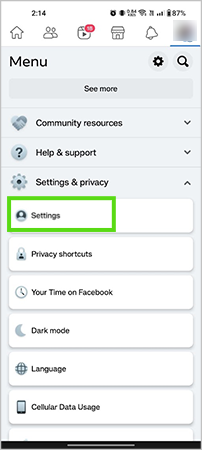
- Scroll down the list, and you’ll see the option “Settings & Privacy.” Tap on it and choose Settings from the list of options.
Step 3:
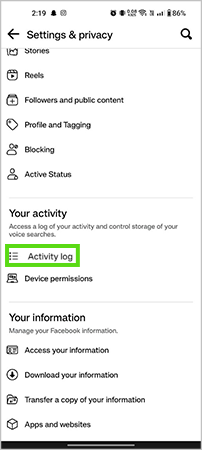
- Scroll down until you find the “Your Activity” section, and tap on “Activity log” right below it.
Step 4:
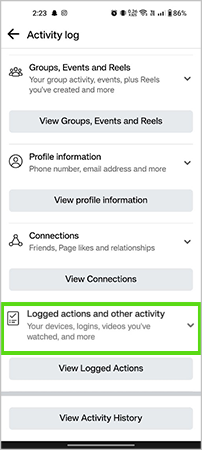
- Now you’ll come to the Activity log of your profile. Scroll down a bit, and you’ll need to tap “Logged actions and other activity.”
Step 5:
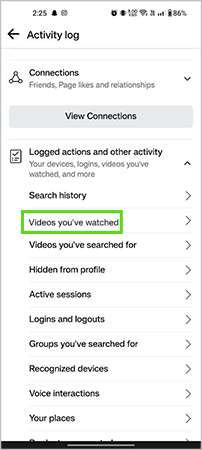
- After tapping on “Logged actions and other activity,” you’ll see some options. You need to tap on “Videos you’ve watched.”
Step 6:
- Now, you’ll see the list of videos you’ve watched so far. You can either delete the whole history from the beginning or delete any specific video you like.
- To delete complete FB watch history:
- Solution Synopsis: Settings & Privacy >> Activity log >> Logged actions and other activity >> Videos you’ve watched >> Clear video watch history
- To delete specific any video(s):
- Go to: Videos you’ve watched >> Tap the three-dot menu >> Delete
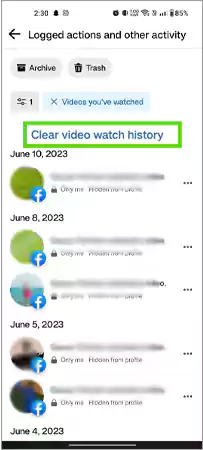
- The list of steps mentioned above can also work for how to delete watched videos on Facebook on iPad. So, if you have an iPhone or iPad, the steps will remain slightly the same. However, it will not show the videos you’ve downloaded with the help of a Facebook video downloader app.
Steps to Delete Facebook Watch History on the Desktop
- The process of clearing the watch history on Facebook can be a bit tricky. However, if you want to delete Facebook watch history on a desktop (Windows or Mac), follow these steps:
Step 1:
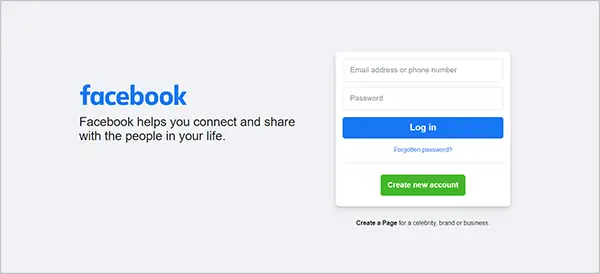
- Log in using your phone number or email address.
Step 2:
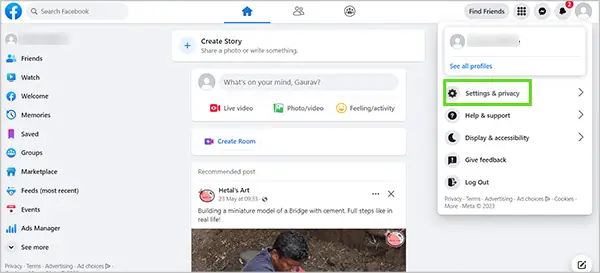
- Click on the Profile icon at the top-right, and choose the “Settings & Privacy” option.
Step 3:
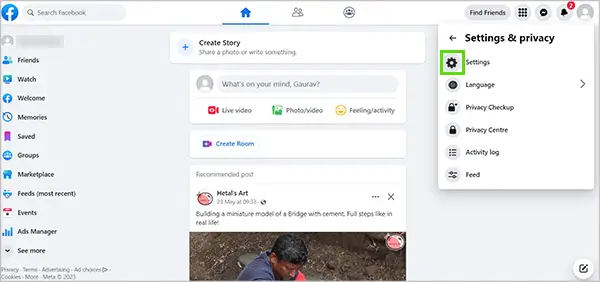
- Choose Settings from the list of options.
Step 4:
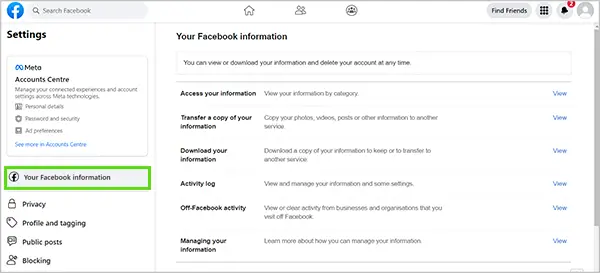
- Click Your Facebook information present at the right.
Step 5:
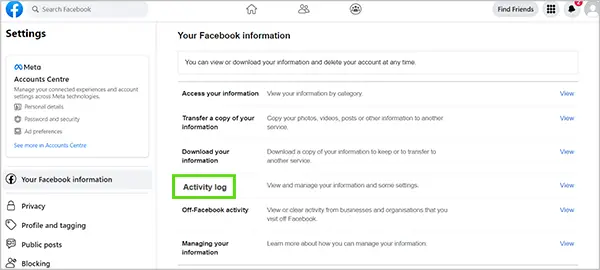
- As you click on it, the information will appear on the screen, which you can download or delete as well. Click on the Activity log.
Step 6:
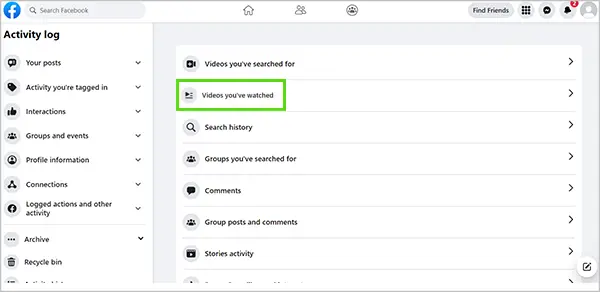
- Click on Videos you’ve watched from the list of options.
Step 7:
- The list of videos you’ve watched so far will appear on the screen. To delete the watch history completely, just click “Clear Video Watch History.”
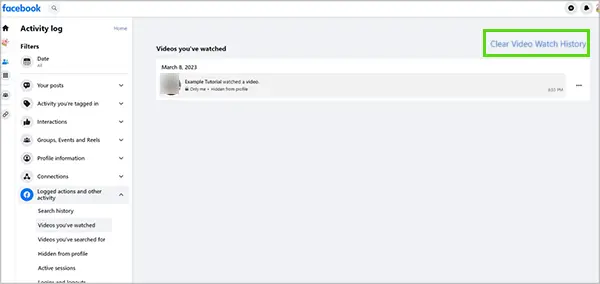
- However, if you just want to delete a specific video, click the three-dot menu present at the right. Click Delete, and you’re done.
- So, if someone mentions how to delete FB watch history, you can help them with these steps mentioned above.